

Codebase Notebook is a VS Code extension that lets you take structured notes across your codebase and quickly jump between code and the notes that describe it.
- Browse all notes in a tree view
- Open, preview, and delete notes
- Drag-and-drop reorder references within notes
- Pin/favorite key references to surface them first
- Tag-based filtering and archive toggle
- Inline actions: pin, tag, archive, comment, delete
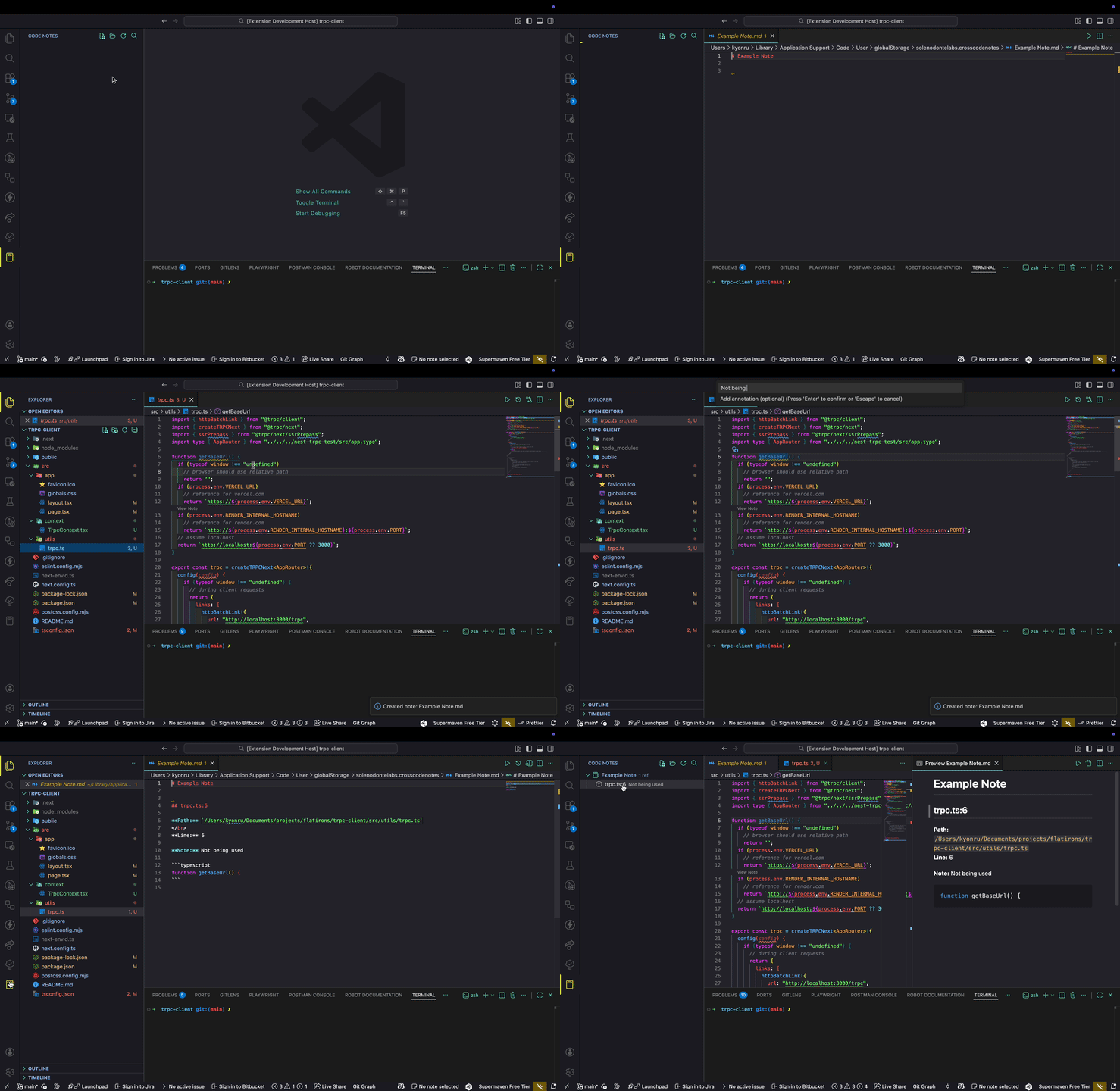
- Activity Bar → Codebase Notebook
- Sidebar tree listing all your notes
- Right-click context menu in editor with full command access
- Commands available in the view header & context menu
- Attach notes to specific files + line numbers
- Jump directly back to referenced code via CodeLens
- Bulk add references — select multiple ranges or files at once
- Auto-update line numbers when code shifts (file change watcher)
- Hover preview — see annotation when hovering over referenced lines
- Quick Add — Single-keystroke annotation without leaving the editor (
Cmd+Shift+L) - Auto Annotate (AI) — AI generates an annotation based on selected code and note context (
Cmd+Shift+;) - Annotation History — Track changes to annotations over time, view full revision history per reference
- Broken Reference Detection — Auto-scan for references to deleted/moved files on startup, with manual command
- Status Bar Badge — Shows count of stale/broken annotations with warning indicator
- Annotation Timeline — Chronological webview showing when annotations were added across all notes
- Annotation Quality Scoring (AI) — Rate annotations for staleness/vagueness and suggest rewrites
- VS Code (default) — Uses built-in Language Model API (GitHub Copilot). Zero config.
- External API — OpenAI, Anthropic, Ollama, or any OpenAI-compatible endpoint. Works in Cursor and other VS Code forks.
- Auto-detect — Automatically picks VS Code LM if available, prompts for external config otherwise.
- API keys stored securely via VS Code SecretStorage (never in plaintext settings).
Use @codenotes in VS Code Chat with these commands:
| Command | Description |
|---|---|
@codenotes /annotate |
Generate an annotation for the selected code and add it to your note |
@codenotes /summarize |
Summarize all references in the current note |
@codenotes /relate |
Find relationships between references in a note |
@codenotes /diff |
Compare code at a reference with its current state |
@codenotes /suggest-note |
Suggest which note a code snippet belongs to |
Additional AI commands (Command Palette):
| Command | Description |
|---|---|
Codebase Notebook: Suggest Note |
AI suggests which note fits the current code (Cmd+Shift+K) |
Codebase Notebook: Auto Annotate (AI) |
AI generates annotation from code context (Cmd+Shift+;) |
Codebase Notebook: Auto-Tag Note (AI) |
Suggest tags for a note based on its references |
Codebase Notebook: Ask Notes (AI) |
Ask questions about your notes ("Which note covers auth?") |
Codebase Notebook: Semantic Search (AI) |
Natural language search across all annotations |
Codebase Notebook: Smart Linking (AI) |
Auto-detect related references and suggest cross-links |
Codebase Notebook: Annotation Quality Score (AI) |
Rate staleness/vagueness and suggest rewrites |
Codebase Notebook: Code Review Assistant (AI) |
Surface relevant annotations during code review (git diff) |
Codebase Notebook: Refresh Stale Annotations (AI) |
Detect changed code and regenerate annotations |
- Tags/labels — Add tags like
#auth,#perf,#bugfor filtering - Archive notes — Hide completed research without deleting
- Note templates — Start from Bug Investigation, Code Review, Feature Exploration, Architecture Decision, or Learning Notes
- Note comments/threads — Add conversation threads on any reference
- Export to Markdown — Generate a standalone document with embedded code snippets
- Import from clipboard — Paste markdown and auto-detect file references
- Share via workspace — Store notes in
.codenotes/for git-committed team sharing
- Reference graph — Interactive webview showing how notes connect to files (click to open)
- References to this file — See all notes referencing the current file
- Semantic Search (AI) — Natural language queries across all annotations (sparkle button in tree view)
- Smart Linking (AI) — Auto-detect related references and add cross-link comments
- Code Review Assistant (AI) — Surface relevant annotations for your git changes
- CodeLens — "View Note" lens on referenced lines
- Inline completions — Annotation suggestions as you type
- Notes are stored as readable Markdown
- Easy to version, sync, and share
- You own your notes (no database, no vendor lock)
| Setting | Description |
|---|---|
crosscodenotes.notesDirectory |
Custom directory for storing notes (supports ~). Leave empty for default. |
crosscodenotes.useWorkspaceFolder |
Store notes in .codenotes/ inside the workspace root for team sharing. |
crosscodenotes.modelFamily |
Preferred AI model family (e.g., gpt-4o, claude-sonnet). Leave empty to choose from all available. |
crosscodenotes.aiProvider |
AI provider: auto (default), vscode, or external. Auto-detects VS Code LM or falls back to API. |
crosscodenotes.aiEndpoint |
Base URL for external AI API (OpenAI-compatible, e.g., https://api.openai.com/v1 or Ollama). |
crosscodenotes.aiModel |
Model name for external provider (e.g., gpt-4o, claude-sonnet-4-20250514, llama3). |
| Command | Description |
|---|---|
Codebase Notebook: Create Note |
Create a new note |
Codebase Notebook: Create Note from Template |
Create from a predefined template |
Codebase Notebook: Select Note |
Switch the active note |
Codebase Notebook: Add Reference |
Attach a code reference to a note |
Codebase Notebook: Quick Add Annotation |
Fast inline annotation (no dialogs) |
Codebase Notebook: Bulk Add References |
Add multiple references at once |
Codebase Notebook: Go to Reference |
Jump to referenced file + line |
Codebase Notebook: View Note |
Open preview of current note |
Codebase Notebook: Search Notes |
Search existing notes |
Codebase Notebook: Export Note |
Export a note as Markdown or to clipboard |
Codebase Notebook: References to This File |
Show notes referencing the active file |
Codebase Notebook: Show Reference Graph |
Open interactive reference graph |
Codebase Notebook: Toggle Workspace Storage |
Switch between global and .codenotes/ storage |
Codebase Notebook: Add Tag |
Add a tag to a note |
Codebase Notebook: Filter by Tag |
Filter tree view by tag |
Codebase Notebook: Archive/Unarchive Note |
Archive or restore a note |
Codebase Notebook: Import from Clipboard |
Import references from clipboard markdown |
Codebase Notebook: Add Comment |
Add a comment to a reference |
Codebase Notebook: View Comments |
View/delete comments on a reference |
Codebase Notebook: Delete Annotation |
Delete a reference and its section from the note |
Codebase Notebook: Show Annotation Timeline |
Chronological view of all annotations |
Codebase Notebook: Detect Broken References |
Scan for references to deleted/moved files |
Codebase Notebook: View Annotation History |
View revision history of a reference |
Codebase Notebook: Set AI API Key |
Store API key securely for external AI provider |
Codebase Notebook: Clear AI API Key |
Remove stored AI API key |
Codebase Notebook: Change Notes Directory |
Select / change the directory used for notes |
Codebase Notebook: Open Notes Directory |
Open storage folder for notes |
Codebase Notebook: Delete Note |
Remove note |
Codebase Notebook: Refresh Notes |
Reload the notes list |
You'll find most actions in:
- Command Palette (Cmd/Ctrl + Shift + P)
- Codebase Notebook sidebar
- Editor right-click context menu
- Tree item inline buttons
| Action | Windows / Linux | macOS |
|---|---|---|
| Add Reference to Notebook | Ctrl + Shift + J |
Cmd + Shift + J |
| Quick Add Annotation | Ctrl + Shift + L |
Cmd + Shift + L |
| Suggest Note (AI) | Ctrl + Shift + K |
Cmd + Shift + K |
| Auto Annotate (AI) | Ctrl + Shift + ; |
Cmd + Shift + ; |
Add Reference (Cmd+Shift+J) |
Quick Add (Cmd+Shift+L) |
|
|---|---|---|
| No note selected | Warning dialog → stops | Auto-picks single note or shows inline picker |
| Confirmation | Modal with "View Note" button | Status bar flash (3 sec) |
| Dialogs | Up to 3 | Just 1 (annotation input) |
| Use case | First-time / deliberate | Rapid-fire while reading code |
Notes are stored locally in a Markdown directory (managed by the extension). They're human readable and version-control friendly.
With workspace storage enabled (crosscodenotes.useWorkspaceFolder), notes live in .codenotes/ at your repo root — commit and share with your team.
If this helps your workflow, consider sponsoring: 👉 https://github.com/sponsors/kyonru
MIT — feel free to hack, extend, and share.