A lightweight desktop productivity coach that runs silently in the background on Windows and macOS.
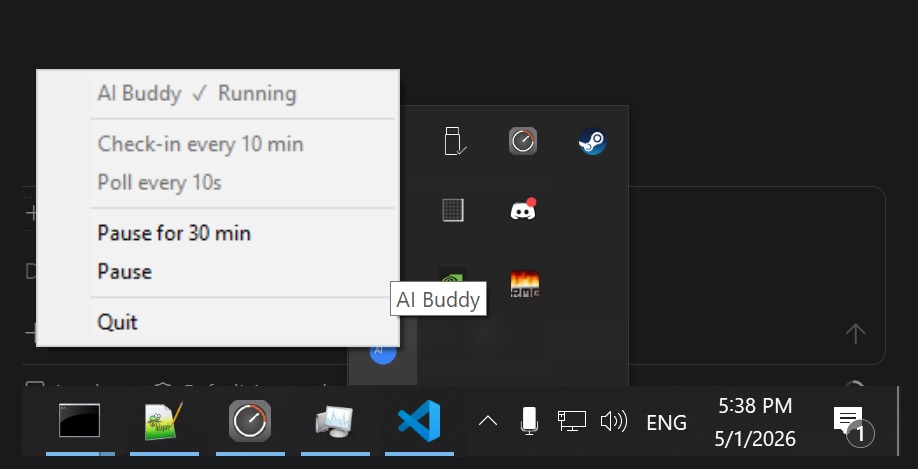
It watches which application you're using every few seconds, then every 10 minutes asks a local LLM to review your screen-time and send you a short, honest push notification — encouraging deep work, calling out distraction, and nudging you toward your daily learning goals.
No cloud. No subscriptions. Everything runs locally on CPU. Configure it to your own taste!
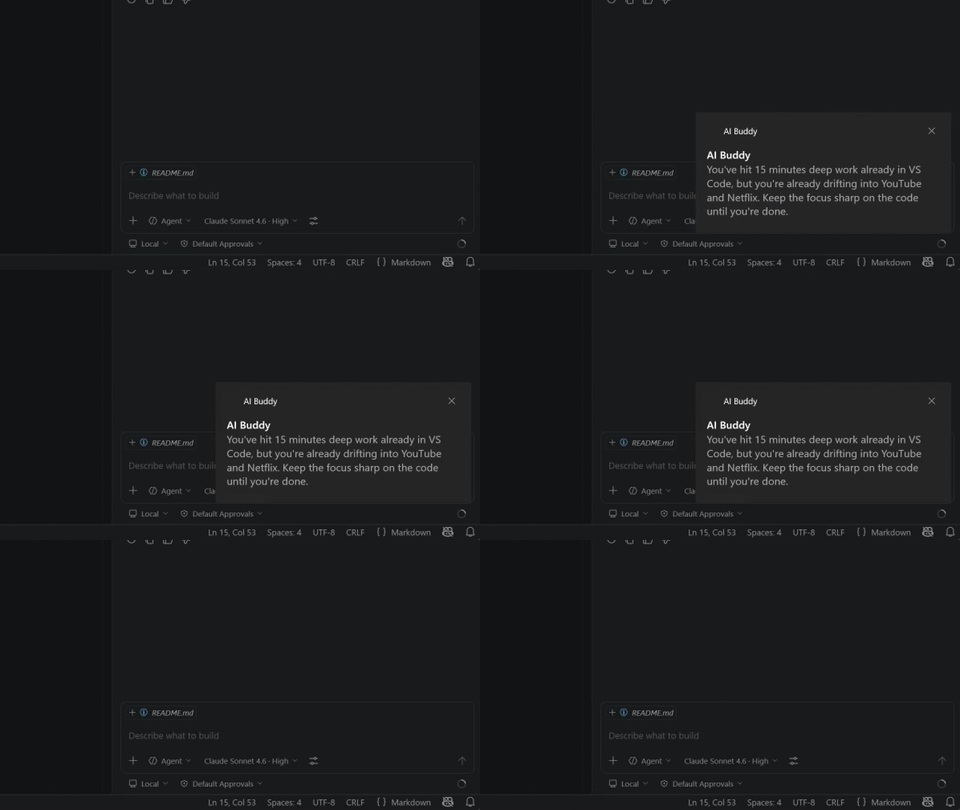
┌─────────────────────────────────────────────────────────────┐
│  main.py  (system-tray icon — main thread)                  │
│                                                             │
│  ┌──────────────────┐      ┌──────────────────────────────┐ │
│  │  tracker thread  │      │  buddy thread                │ │
│  │                  │      │                              │ │
│  │  every 10s:      │      │  on start: load GGUF model   │ │
│  │  sample active   │────> │  every 10 min: query DB,     │ │
│  │  window → SQLite │      │  run LLM, send toast         │ │
│  └──────────────────┘      └──────────────────────────────┘ │
└─────────────────────────────────────────────────────────────┘
ai-buddy/
├── src/                      # all Python source code
│   ├── config.py             # settings — edit this to customise everything
│   ├── db.py                 # SQLModel/SQLAlchemy database layer
│   ├── tracker.py            # active-window poller
│   ├── buddy.py              # LLM analysis loop
│   ├── notifier.py           # platform-aware notifications
│   └── main.py               # entry point + system-tray icon
├── AGENT.md     # LLM system prompt — personality, schedule, goals
├── models/                   # place your GGUF model file here
├── data/                     # SQLite database (auto-created)
├── logs/                     # log files (auto-created)
├── requirements.txt
├── setup.bat                 # Windows one-click setup
└── setup.sh                  # macOS one-click setup
| File | Role |
|---|---|
src/config.py |
All tunable settings (intervals, model path, your name, …) |
src/db.py |
SQLModel/SQLAlchemy database layer; WAL mode for thread safety |
src/tracker.py |
Polls the foreground window and writes to SQLite |
src/buddy.py |
Loads the GGUF model, runs analysis, fires notifications |
src/notifier.py |
Platform-aware notifications (Windows toast / macOS osascript / tkinter fallback) |
AGENT.md |
LLM system prompt — personality, schedule, daily goals |
src/main.py |
Entry point: launches threads, hosts the system-tray icon |
- Windows 10/11 (64-bit) or macOS 12 Monterey+
- Python 3.10+
- ~1.5 GB free RAM for the LLM model
- ~1.4 GB disk for the GGUF model file
AI Buddy needs Screen Recording permission to read window titles (macOS 10.15+). Grant it in System Settings → Privacy & Security → Screen Recording and add Terminal (or your Python executable). Without it, app names are still tracked but window titles will be blank for most apps.
Optionally also grant Accessibility for best compatibility.
git clone https://github.com/2coderok/ai-buddy.git
cd ai-buddypython -m venv .venv
.venv\Scripts\activate.\setup.batThis installs all dependencies, installs llama-cpp-python, creates the models\ folder,
and optionally adds AI Buddy to your Windows startup.
git clone https://github.com/2coderok/ai-buddy.git
cd ai-buddybash setup.shThis creates a .venv, installs all dependencies (including pyobjc for window tracking),
installs llama-cpp-python, and optionally registers a launchd agent so AI Buddy starts
at login.
If you prefer to install step by step:
# Create and activate venv
python -m venv .venv
source .venv/bin/activate          # macOS
# .venv\Scripts\activate           # Windows

# Install dependencies
pip install -r requirements.txt

# Install llama-cpp-python (pre-built CPU wheel)
pip install llama-cpp-python \
    --extra-index-url https://abetlen.github.io/llama-cpp-python/whl/cpu
Windows fallback (if the pre-built wheel fails — requires Visual Studio C++ Build Tools):
pip install llama-cpp-pythonmacOS fallback (if the pre-built wheel fails — requires Xcode Command Line Tools):
xcode-select --install
pip install llama-cpp-python
The default model is Qwen 3.5 2B Q4_K_M — a 1.3 GB, 4-bit quantised model chosen deliberately to be light on CPU-only systems. It runs comfortably on any modern laptop with no GPU required, and its small size keeps inference fast enough for a 10-minute check-in loop.
Want better quality? Drop in any larger GGUF model and point
MODEL_PATHat it inconfig.py. If your machine has a GPU, install the CUDA or Metal build ofllama-cpp-pythoninstead of the CPU wheel and setn_gpu_layersinbuddy.pyto offload layers to the GPU. Larger models (7B, 14B) will produce noticeably richer and more nuanced responses.
Download Qwen3.5-2B-Q4_K_M.gguf (~1.3 GB) from Hugging Face:
https://huggingface.co/unsloth/Qwen3.5-2B-GGUF
Create a models\ folder inside the project directory and place the file there:
ai-buddy/
└── models/
    └── Qwen3.5-2B-Q4_K_M.gguf   ← here
Open config.py and adjust any settings:
| Setting | Default | Description |
|---|---|---|
POLL_INTERVAL_SECONDS |
10 |
How often the active window is sampled |
ANALYSIS_INTERVAL_MINUTES |
10 |
How often the LLM checks in |
N_THREADS |
4 |
CPU threads for inference (raise if you have more cores) |
USER_NAME |
"Friend" |
Your name — personalises messages |
MODEL_PATH |
models/Qwen3.5-2B-Q4_K_M.gguf |
Path to the GGUF file |
Windows — with a console (recommended for first run):
python src\main.pyWindows — silent background mode (system tray only):
pythonw src\main.pymacOS — with a console (recommended for first run):
source .venv/bin/activate
python src/main.py
macOS — background mode:
python src/main.py &
# or load the launchd agent created by setup.sh:
launchctl load ~/Library/LaunchAgents/com.aibuddy.app.plist
Right-click the tray icon (Windows) or menu-bar icon (macOS) to quit.
python src/tracker.py --stats today
python src/tracker.py --stats week
python src/tracker.py --stats month
python src/tracker.py --stats allpython src/tracker.py --trackRun setup.bat and answer y when prompted — it creates a shortcut in your Windows Startup folder:
.\setup.batTo remove it, delete:
%APPDATA%\Microsoft\Windows\Start Menu\Programs\Startup\AI Buddy.lnk
Run setup.sh and answer y when prompted — it installs a launchd agent:
bash setup.shTo remove it:
launchctl unload ~/Library/LaunchAgents/com.aibuddy.app.plist
rm ~/Library/LaunchAgents/com.aibuddy.app.plistThe LLM's behaviour, tone, and daily goals are defined entirely in AGENT.md — no code changes needed. Edit it freely to:
- Change the personality (more strict, more playful, etc.)
- Update your working hours / days off
- Add or remove daily learning goals
- Adjust how the buddy interprets specific apps
The buddy tracks three recurring daily goals and nudges you toward any that look untouched as the working day progresses:
- Algorithm of the day — study or implement one algorithm/data structure
- Chord of the day — practise one new piano chord
- Reading — at least one chapter from an intellectual or startup-themed book
These are just the defaults. Open AGENT.md and edit the Daily Goals section to swap in whatever habits matter to you — e.g. writing 500 words a day, solving a math problem, reviewing flashcards, or a gym session. No code changes required.
| Day | Working hours |
|---|---|
| Monday – Thursday | 10:00 – 22:00 |
| Friday | 10:00 – 18:00 |
| Saturday | Off (no coaching) |
| Sunday | Flexible |
Outside working hours the buddy goes silent — no nudges, no productivity pressure.
To change the schedule, edit WORKING_HOURS in src/config.py:
WORKING_HOURS = {
    "Monday":    (10, 22),   # (start_hour, end_hour)
    "Tuesday":   (10, 22),
    "Wednesday": (10, 22),
    "Thursday":  (10, 22),
    "Friday":    (10, 18),
    "Saturday":  None,        # None = always off, no coaching
    "Sunday":    "flexible",  # "flexible" = relaxed, no pressure
}
The schedule is injected into the LLM prompt automatically — no need to edit AGENT.md.
Runtime logs are written to logs/buddy.log. Set LOG_LEVEL = "DEBUG" in src/config.py to see every LLM prompt and window event.
All data stays on your machine:
- Screen-time data →
data/activity_tracker.db(local SQLite file) - LLM inference → runs fully on CPU via llama.cpp (no network calls)
- Notifications → Windows Action Center or macOS Notification Center (local only)
MIT