

A modern take on the classic source code printing app from 1988.
Human and AI Agent friendly print utility with syntax highlighting, multiple pages-up, headers/footers. Cross platform (Mac, Linux, Windows) GUI, TUI, and CLI. Print source code, web pages, and reports generated by legacy systems.

The wp terminal UI renders true print previews as sixel graphics, without leaving the terminal: page through a document, zoom in, pan smoothly with the mouse, switch sheet definitions, and open another file.
winget install Kindel.WinPrintbrew install --cask winprintbrew install winprintSee the Installation Guide for detailed instructions, prerequisites, and upgrade/uninstall steps.
Launch the TUI (terminal interface):
wpLaunch the GUI:
wp guiYou can also find WinPrint in the Start Menu (Windows) or via Spotlight (macOS).
- Prints source code with syntax highlighting and line numbering using bundled TextMate grammars.
- Prints HTML files.
- Prints "multiple-pages-up" on one piece of paper (saves trees!)
- Complete control over page formatting options, including headers and footers, margins, fonts, page orientation, etc.
- Headers and Footers support detailed file and print information macros with rich date/time formatting.
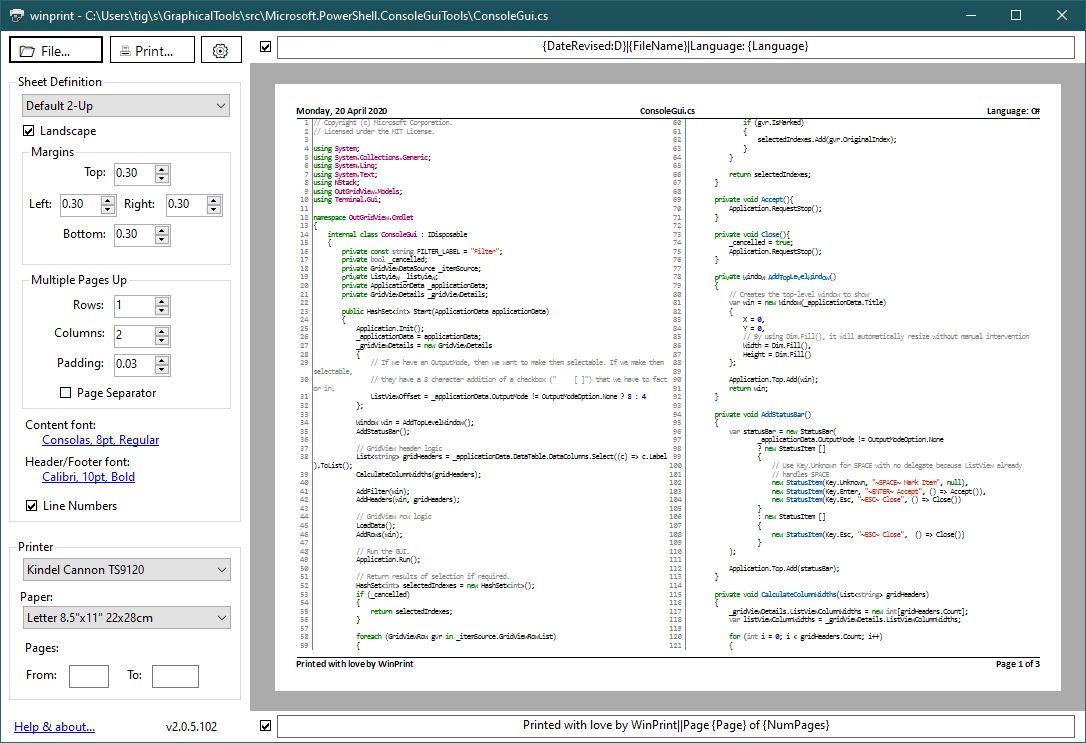
- Simple and elegant graphical user interface with accurate print preview.
wpprovides a Terminal.Gui.Cli-based command line with JSON output and OpenCLI metadata for agents.- The legacy PowerShell
Out-WinPrintCmdLet remains available asWinPrint.PowerShell.dll, but is deprecated in favor ofwp. - Sheet Definitions make it easy to save settings for frequent print jobs.
- Comprehensive logging.
- Cross-platform: Windows, macOS, and Linux.
(This is the soon to be depericted WinForms based GUI. An almost identical-looking Maui-based GUI that works on both Mac and Windows is available).
Count sheets without printing and emit a JSON envelope:
wp Program.cs --what-if --jsonPrint a file to a named printer:
wp Program.cs --printer "Microsoft Print to PDF" --title "Program.cs"Print with language override:
cat profile.ps1 | wp --language powershell --title "PowerShell profile"Get machine-readable command metadata:
wp --opencliSee the User's Guide for complete CLI documentation.
See CONTRIBUTING.md for development setup, build instructions, and release process.